Showing posts with label 1. Show all posts
Showing posts with label 1. Show all posts
Monday, November 24, 2014
Download Address Book Application for Blackberry ★ 1 Click Address book APP
BlackBerry users usually call up the Address Book application to quickly find a phone number or e-mail or to enter new contact information. Being able perform these actions quickly is important.
If you have a fairly large list of contacts in your Address Book, quickly finding the right entry when composing an e-mail or making a phone call maybe can be frustrating, especially if you remember only a tiny bit of the contact’s information.
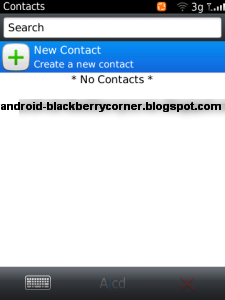
For maximum efficiency, start by keeping your Address Book sorted in the same way you are likely to look for contacts. If you are in sales and generally organize your contacts by company, sort your Address Book by company. Similarly, if you are more comfortable searching by last name, set your sort option to use last names.
When you add a contact to the Address Book in a hurry, you sometimes enter only the minimum amount of information necessary, such as name and phone number. When editing an Address Book entry, the phone fields (Work, Home, Mobile, and so on) all allow you to enter their values using the number keys. You do not have to use the ALT key when entering numbers for these fields.
When you add a contact to the Address Book in a hurry, you sometimes enter only the minimum amount of information necessary, such as name and phone number. When editing an Address Book entry, the phone fields (Work, Home, Mobile, and so on) all allow you to enter their values using the number keys. You do not have to use the ALT key when entering numbers for these fields.
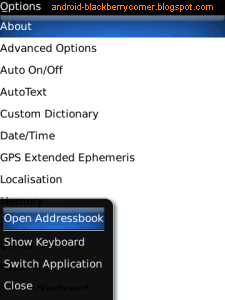
Do you want access your BlackBerry contacts from any where in your BlackBerry?
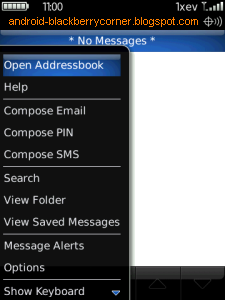
Use "1-Click Address book APP" to manage address book in your Blackberry. This app will add the menu item for all applications. So you can access your BlackBerry contacts from any where. Just by clicking the “Open Address book” in menu item you can access contacts from any where. This application is one of the best plug-in for your BlackBerry Address book. Use this tool save your time and battery. This app will help you to access your BlackBerry contacts very easily.
Use "1-Click Address book APP" to manage address book in your Blackberry. This app will add the menu item for all applications. So you can access your BlackBerry contacts from any where. Just by clicking the “Open Address book” in menu item you can access contacts from any where. This application is one of the best plug-in for your BlackBerry Address book. Use this tool save your time and battery. This app will help you to access your BlackBerry contacts very easily.

DOWNLOAD 1-Click Address book APP
Features "1-Click Address book APP" for Blackberry :
- One click to access the BlackBerry® Address book from any where.
- No need to run BlackBerry Address book as a background application. So save your battery.

Tuesday, November 18, 2014
Samsungs Galaxy Note 10 1 on sale after 2012 Olympic
The London 2012 Olympic Games have become a legend a few days ago.As the Official Worldwide Olympic Partner in Wireless Communications Equipment for the London 2102 Olympic Games, Samsung reap sales during the Olympics Games. Good news continues, Yesterday Samsung Company announced at an event in New York that the Samsung Galaxy Note 10.1 Tablet will go on sale Aug. 16. Today the companys new Tablet Galaxy Note 10.1 officially listed in the U.S.
The Galaxy Note 10.1 comes in two models: The 16 GB version retails at $499 and the 32 GB model retails at $549. Color white and dark gray are provided, which you can buy from Best Buy, Amazon and other retailers. Samsung’s new tablets compete with Apples iPad and the upcoming Microsoft Surface tablet.
In fact, Galaxy Note the first is a 5.3 inches smart phones, because of its size ranged between smartphones and tablet PCs, dubbed the "Phablet (Phablet = phone + the tablet). Galaxy Note 10.1 is not a cellphone, but compared with the Galaxy Note with a smaller body, version 10.1 also equipped with a pressure-sensitive stylus, called S Pen.
S Pen can be used for the Galaxy Note 10.1 multi-Lcd display function, users can browse the applications or Web pages, while also use the S Pen to take notes at the same time.

Things get interesting once you start using the S Pen. As soon as you remove the stylus from its housing, a pop-up menu will appear on the right side of the Lcd that displays all the apps that are designed to work with the S Pen. This includes S Note, S Planner, Crayon Physics, Photoshop Touch and Polaris Office.
Photoshop Touch is pre-installed in the Galaxy Note 10.1. Files can be synchronized to the Adobe Creative Cloud, and open on the PC. Adobe Creative Cloud provides 2GB of free storage space.
The same application software pre-installed in the Galaxy Note 10.1 also includes e-books from Kno and Barnes & Noble. Users can also get Drop box cloud storage capacity of 50GB free for two years.
The Samsung Galaxy Note 10.1 will still run Android 4.0 Ice Cream Sandwich with 1.4-GHz quad-core processor. As far as hardware, the Galaxy Note 10.1 isn’t a real standout, which has a 10.1-inch display with a 1,280 by 800 pixel resolution. It also has a 5 million pixel camera and a 1.9 million pixel front camera.
Galaxy Note 10.1 also provides the form of a floating window to play the video, function as “Pop up the Play". This feature first appeared on Samsungs Galaxy S III smartphone. But on Galaxy Note 10.1, the user can adjust the size of the floating window.

Samsung Galaxy Note 10 1 a new generation on tablet
In previous, Samsung launched its Galaxy S3 smartphone in order to complete with the new iPhone. Now The Galaxy Note 10.1 is Samsung’s latest attempt to take on the iPad and threaten Apples dominance in the tablet market, with new features of the stylus pen. The new Galaxy Note 10.1 creates a new generation on the tool tablet.
The new tablet features several standout design decisions that make it absolutely stand out from the crowd. Besides Inside rocks with a 1.4GHz quad-core processor in addition to 2GB RAM, the new Note, is also a tablet featuring a 10.1 inch LCD display, the aforementioned processor and ram package, a 5 megapixel rear camera with LED flash and a 1.9 megapixel camera in the front for video calling. Also the Note equipped with a special S Pen.
Now let’s preview what we can do with the new Galaxy Note 10.1.
1.Multi-tasking on the same Lcd
With original multi-Lcd display function, the user can watch video while browsing; you can take notes while watching video, which makes the tablet to achieve PC-class real personal experience.
2.High quality games for quad-core

3.Professional image processing software

Samsung GALAXY Note 10.1 can be the best learning tool with the function of painting. Schoolchildren can complete the task by Galaxy Note 10.1, through easily sketched standard geometry and writing formulas. While Undergraduate and graduate instructional can view videos online, and use the S Note take notes while watching video at the same time.
With the systems become more and more perfect nowadays, the hardware now has been basically one in demand. The main competition for the future of the tablet market is gradually transferred from the hardware to the competition in features and applications. Unlikely used the tablet for entertainment in past, Samsung Galaxy Note is undoubtedly the first step in market, make the tablet become a necessity of life, let the tablet become a tool to simplify life. In this sense, Galaxy Note creates a new generation on tablet.
Monday, November 17, 2014
Galaxy S3 Jelly Bean update coming soon Galaxy S2 Android 4 1 tests also on the way

The hottest Android handset available in stores right now is the Galaxy S3, but Samsung’s flagship handset is not running Google’s latest mobile operating system, Android 4.1 Jelly Bean. The Galaxy S3 was released in late May, a month ahead of the Google I/O event where Jelly Bean was first unveiled, with the OS running only on the Nexus 7 initially.
Google said that Nexus-branded smartphones (Nexus Galaxy and Nexus S) but also the Motorola Xoom tablet, will be the first ones to get Jelly Bean support, but in the mean time we’ve seen plenty of Android 4.1 ports for a variety of devices. Not to mention that the first CyanogenMod 10 preview builds have started to appear, and the Galaxy S3 is supported.
Today we hear that Samsung is already testing Android 4.1 for the Galaxy S3 and Galaxy S2, but we have no release dates for you at this time.
According to an insider that spoke to Sam Mobile “Samsung is almost ready to update” the Galaxy S3 to Jelly Bean, and by almost ready the publication means August or September. We have already wondered how fast the Jelly Bean update for the Galaxy S3 update would arrive a few weeks ago. At the time we read a report that suggested Samsung engineers took extra measures to make sure the device will offer a great Jelly Bean experience, but Samsung has kept quiet on its Android 4.1 upgrade plans.
Moreover, Samsung is also testing Android 4.1 on the Galaxy S2, which is pretty much what we would expect from the company. However, that doesn’t mean we’ll see a timely Jelly Bean release for the Galaxy S2 varieties out there – and we don’t even dare ask about the Galaxy S Jelly Bean build yet.
However, the same blog says “Samsung will update the Galaxy S II if the porting to Android 4.1 on the Galaxy S II goes well.” The Galaxy S2 is already successfully running Ice Cream Sandwich so it should have no problem getting Jelly Bean as well.
We’ll be back with rollout dates for various markets for both the Galaxy S3 and Galaxy S2 in the following weeks and months, so keep us bookmarked!
Tuesday, November 4, 2014
Motorola Moto X 1 is being talked here

Motorola have been allegedly preparing a Moto X+1 smartphone as their next flagship handset, and we have been hearing and seeing numerous rumors and leaks about the Americans next generation bellwether smartphone, yet to go official from the Lenovo owned company, Motorola Mobility. Back in April, we had reported you, that Moto Xs successor phone will offer new backplate options for the looming Moto X+1. While, Motorolas current flagship handset and other devices like Moto G has been a blockbuster in the United States, as well as other parts of the world, we have the firms next phone already peeping out the crooks.
Accordingly, the popular and customary tipster, evleaks from Twitter has got a new Press render of a smartphone on their database, calling it the impending Motorola Moto X+1. The handset here is actually "encased", meaning swaddled in a protective case, inside out. But, the device we witness here seems to sport some noticeable changes from what we have been already seeing on the internet for a while now. First and foremost, we cant find a LED flash light anywhere near the main camera lens, from its back facet (image on the right side). And on the left/front, we get to see couple of front-sided speakers, like the ones packed on the companys latterly announced Moto E handset. Also the phone here dont looks to feature a front facing secondary camera, at any cause, again shedding lights to the name of Moto E. And why is that Sun Beam Google Play Edition sort of live wallpaper being pictured here? We are sorry, there is no definite answer we can give you at the moment.
Lamentably, there is no point in expecting a front runner smartphone without an LED flash and a front facing snapper in a year like 2014, as we may be looking at an untamed Google Play Edition of Moto E smartphone from the wild. However, the phone here is having its power switch and volume up and down rockers placed on the right side of the smartphone, along with a microphone fitted on the back side. We must be waiting for some more news to confirm, which this smartphone, basically is.
Update: evleaks has posted a new image, that falls in line with the previous leak you see above, the smartphones you are seeing here are now reported to be the Verizon Wireless version of Motorola Victara, stuffed in Incipio made DualPro Hard Shell Case with Impact Absorbing Core.

Source: @evleaks 1, 2
Tuesday, September 30, 2014
Update to Windows 8 1
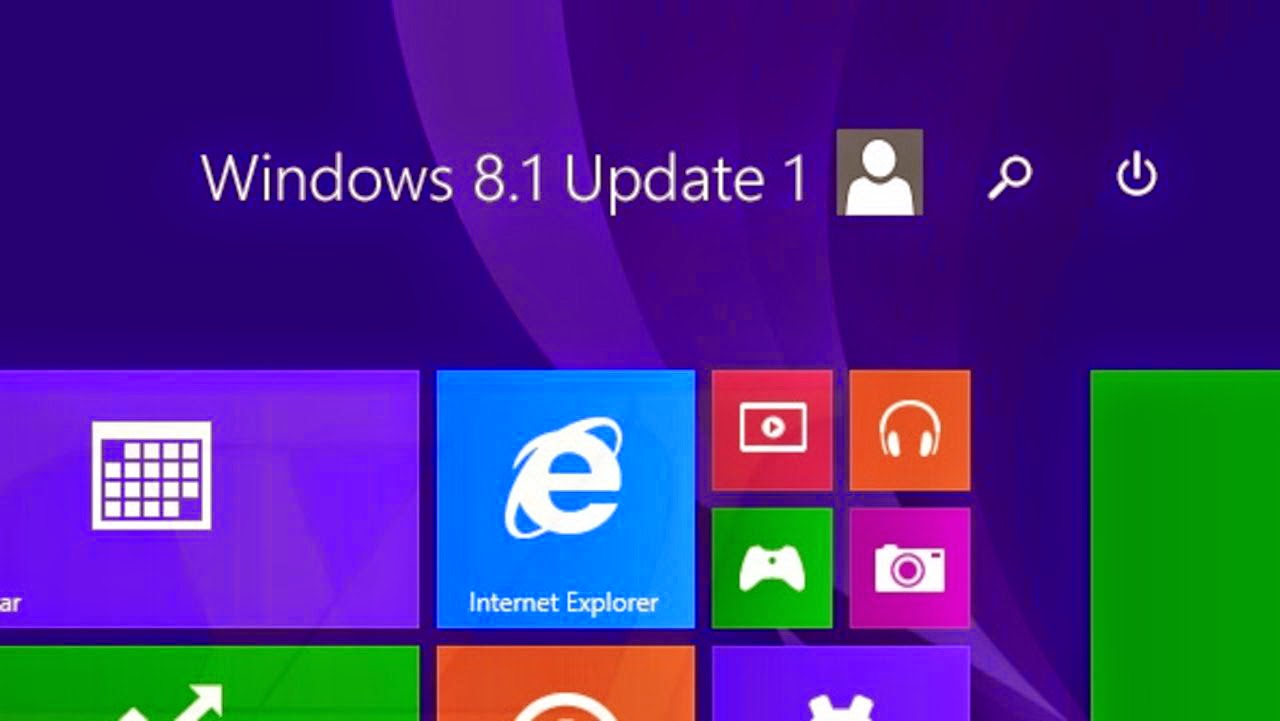
Microsoft made a big enough change at the latest update for Windows 8.1. With the full name Windows 8.1 Update 1, Microsoft apparently heard few complaints of users who still feel awkward using Windows 8, which originally was more emphasis on touch-screen based user.
The presence of this Update 1 is the bridge for users familiar with the methods of the desktop and user-based touch screen. Therefore many new features back showing the ease for the user desktop.
Therefore, for those who have yet to do this update immediately do so and you will feel the difference which makes Windows 8.1 is more convenient to use. The following steps must be done:
Users of Windows 8
For users of Windows 8, you first have to do a Windows update to 8.1. Even before that, you also have to do an update can be obtained from Windows Update.
- Run the Windows Updates by going to the Control Panel in advance. Press the Windows key + R, and type control, click OK. Go to System Security & > Windows Update. Click Check for updates, and wait a few moments. Later will be shown some updates that you can manually select or choose all. It is recommended you select all of the updates to get more optimal. Click Install to begin downloading and installing it.
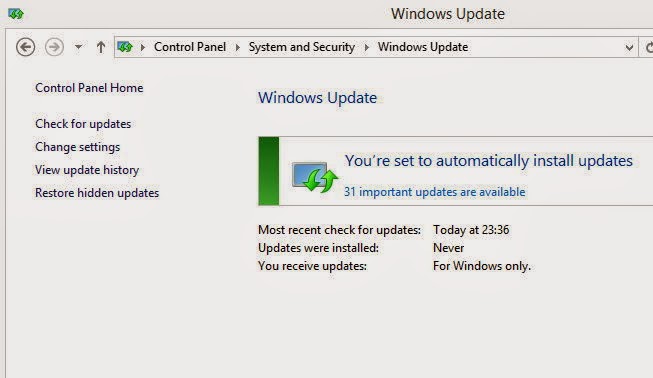
- Once completed, the system will restart. Wait until the process is completed. Then go to the Store, and Windows search Windows Update to 8.1. Click to confirm.

- The previewscreenwill appearand confirmthat you willdownload Windows8.1(Pro)whichhas a capacity of3.63-GB.Click Downloadto begin.Thisupdate processwill immediatelyupdateto Windows8.1Update 1.Dont forget touseyouraccountas an administratorandverify thatyourInternet connection isstableandsmoothly.Laterthere will bea processrestartseveral timesto finish.

Users of Windows8.1 - Similar tothe first stepinWindows 8, pressthe Windows key+ R, andtypecontrol,click OK.Goto SystemSecurity&>Windows Update.ClickCheck forupdates,ticktheallavailable updates.Click Installto begindownloadingand installing it.
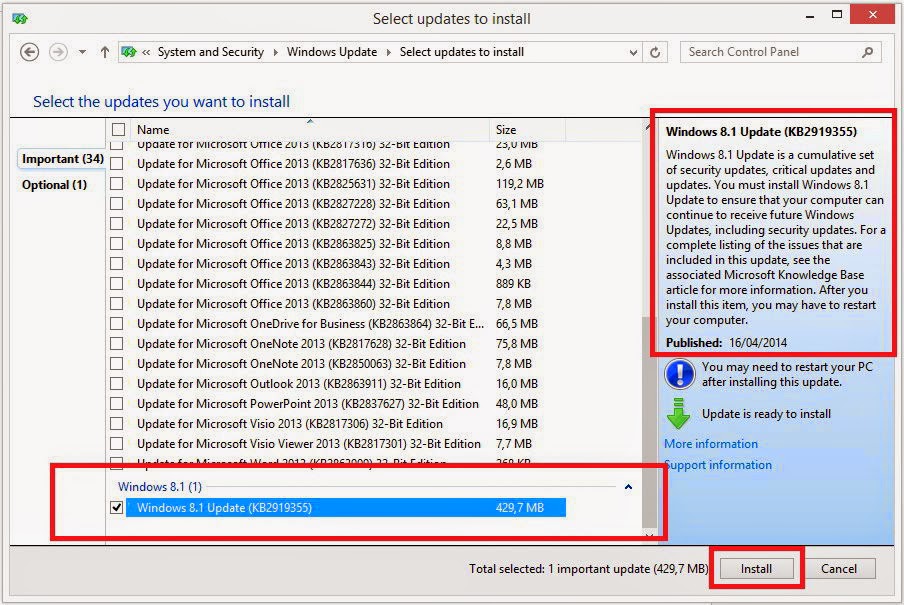
- Afterrestart, goback to WindowsUpdate,click onCheck forupdates.Laterwill be showna Windows file429,7-sizedupdate8.1MB,tickandclick Install.Once completed, the Windows8.1youhave turned intoWindows8.1Update 1.Andyou can seethe changesthere.
Friday, September 19, 2014
Motorols Xoom 2 3G MZ616 10 1
List of Videos:
Tech Specs:
| Motorola Xoom 2 - 3G – MZ616 | |
| General and Software | |
| Form Factor | Tablet – candybar |
| Operating System | Android 3.2 Honeycomb |
| Device Emulator Image | SDK add-on |
| Physical Keyboard | No – Virtual QWERTY keyboard |
| Announced | 2011 December |
| Status Available | 2011 December |
| Additional Navigation Control | Extra Large |
| Browser & Internet | Android HTML Webkit |
| Adobe Flash Support | Adobe Flash Player 10 |
| Java | MIDP emulator |
| Display | |
| Size, diagonal | 10.1 inches |
| Display Resolution | 1280 x 800 pixels |
| Generalized Pixel Density | Medium (160 dpi) |
| Primary Display Orientation | Portrait |
| Screen Rotation | Four-way |
| TFT – Touchscreen – Capacitive 16M colors – Coming Gorilla Glass | |
| Connectivity | |
| WAN / Network 2G | GSM 850 / 900 / 1800 / 1900 Mhz |
| WAN / Network 3G | WCDMA 850 / 900 / 1900 / 2100 Mhz |
| WAN / Data | HSDPA 21.1 Mbps (Category 14), EDGE Class 12, HSUPA 5.76 Mbps (Category 6) |
| 4G | HSPA+ |
| Wireless LAN | 802.11a/b/g/n – Mobile hotspot – DLNA |
| Bluetooth | Class 2, v2.1 + EDR + A2DP |
| Bluetooth Profiles | A2DP, AVRCP, GAP, GAVDP, GOEP, HID, HSP, OPP, PAN NAP, PAN PANU, SPP |
| USB | USB 2.0 High Speed – Mass storage |
| Audio/Video Output | HDMI 1.4 |
| Audio jack 3,5 mm | Yes |
| Infrared port | No |
| GPS / Location Based Services | Assisted GPS – E-Compass – Standalone GPS w/internal antenna |
| Camera | |
| Camera Resolution (max) | 5 megapixels (2560 x 1920) |
| Camera secundary | 1.3 megapixels, focus fixed |
| Camera Focus | Auto |
| Camera Flash | LED |
| Camera Zoom (max) | 8x |
| Image Capture Formats | JPEG |
| Additional Camera Features | Anti-banding, Color effects, Scenes, White balance |
| Media | |
| Media Formats | Android core media formats - VC-1 decoder – WMA 10 decoder |
| Audio Player | MP3, AAC, WAV, WMA |
| Video Player | H.263, H.264, MPEG-4, WMA |
| Video Recording | 720p HD (1280 x 720 pixels) |
| Video Recording Frame Rate | 30 fps |
| Video Playback | 1080p HD (1920 x 1080 pixels) |
| Video Playback Frame Rate | 30 fps |
| Google Music Player | |
| Loudspeaker | Stereo |
| Processor and memory | |
| Processor / SoC | Chipset TI OMAP4430 – 45 nm - ARMv7 - CPU: 1-1.2 GHz Dual-Core ARM Cortex-A9 – GPU: PowerVR SGX540 @ 304 Ghz- Dual-channel LPDDR2 memory controller – Q1 2011 |
| Processor Clock Speed | 1.2 Ghz |
| RAM | 1GB |
| Internal memory | 16GB / 32GB |
| Memory Card Type | MicroSD |
| Memory Card Size Supported | Up to 32GB |
| Sensors | |
| Accelerometer | Yes |
| Digital Compass | Yes |
| Proximity Sensor | No |
| Ambient Light Sensor | Yes |
| Additional features | Gyroscope, Barometer |
| Notifications | Notofication Light tricolor – No vibrate |
| Power | |
| Battery Type | Standard Li-Ion 7000 mAh |
| Stand-by time | Up to 30 days |
| Browsing over WIFI: up to 10 hours MP3 PlayBack: up to 6 days VIDEO PlayBack Time: up to 10 hours | |
| Divers | |
| Messaging | EMAIL: Corporate Sync, Google Mail, POP3/IMAP (embedded), Instant Messaging (IM): Google Talk with Video Chat |
| Games | Yes, downloadable |
| Color | Black |
| Phone Book | Yes |
| Organizer | Yes |
| Agenda | Yes |
| Calendar | Yes |
| Task | Yes |
| Notes | Yes |
| Voice memo | Yes |
| Predictive text | Yes |
| Watch | Yes |
| Alarm | Yes |
| Diary | Yes |
| Calculator | Yes |
| Documend Viewer | Yes |
| Flight mode | Yes |
| Weight | 603 grams (21.13 oz) |
| Dimensions | 253.9 x 173.6 x 8.8 mm (10.00 x 6.83 x 0.35 in) |
| Full suite of Google mobile services: Gmail – Google Calendar – Google Contact Sync – Google Latitude – Google Maps Street View – Google Maps – Google Maps Navigation – Google Quick Search Box – Google Talk – Google eBooks – Google Search by Voice – YouTube | |
| HDMI Status – MOTOPRINT v2+ | |
| Computer synchronization, OTA synchronization | |
Gallery:


Wednesday, September 3, 2014
LG F240 Mobile Android 4 1 Jelly Bean and Specs FULL HD with Quad Core Snapdragon
LG F240, Mobile Android 4.1 Jelly Bean and Specs FULL HD with Quad Core Snapdragon - As we know that LG as one of the largest mobile phone manufacturers do not want to miss the android phone presents the latest innovations and more advanced technology to be able to compete with the current market, as some time ago where LG brings Android phone is quite attracted much attention including the LG Optimus M and Nexus 4 because both phones have superior specs in it. And now the phone with Full HD screen to be a popular one, and that can be offered by the mobile phone manufacturer LG which the party did not want to miss the back to bring a cell phone with a code known LG F240.
Phone with code LG F240 will use a Full HD screen, powered with a 1.5 GHz quad-core processor Snapdragon S4 Adreno 320 pro and in addition such as information obtained from the benchmark GLBenchmark seen on the internet that this phone will run the Android operating system 4.1 Jelly Bean .
It seems to be a lot of choice for people who want to have android phones that include Full HD HTC Droid DNA, Oppo Find 5 and Lenovo who was in the process of making an Android phone Dual SIM Full HD version. Are you interested in having one in Full HD is an Android phone, we wait for further information about Full HD android phone that will enliven the mobile market today and also Full HD android phone that will be presented by the LG namely the LG code F240.
Subscribe to:
Posts (Atom)