Showing posts with label Download. Show all posts
Showing posts with label Download. Show all posts
Monday, November 24, 2014
Download Address Book Application for Blackberry ★ 1 Click Address book APP
BlackBerry users usually call up the Address Book application to quickly find a phone number or e-mail or to enter new contact information. Being able perform these actions quickly is important.
If you have a fairly large list of contacts in your Address Book, quickly finding the right entry when composing an e-mail or making a phone call maybe can be frustrating, especially if you remember only a tiny bit of the contact’s information.
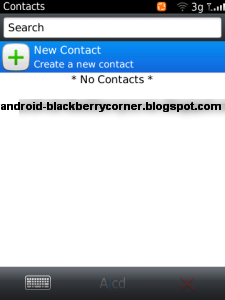
For maximum efficiency, start by keeping your Address Book sorted in the same way you are likely to look for contacts. If you are in sales and generally organize your contacts by company, sort your Address Book by company. Similarly, if you are more comfortable searching by last name, set your sort option to use last names.
When you add a contact to the Address Book in a hurry, you sometimes enter only the minimum amount of information necessary, such as name and phone number. When editing an Address Book entry, the phone fields (Work, Home, Mobile, and so on) all allow you to enter their values using the number keys. You do not have to use the ALT key when entering numbers for these fields.
When you add a contact to the Address Book in a hurry, you sometimes enter only the minimum amount of information necessary, such as name and phone number. When editing an Address Book entry, the phone fields (Work, Home, Mobile, and so on) all allow you to enter their values using the number keys. You do not have to use the ALT key when entering numbers for these fields.
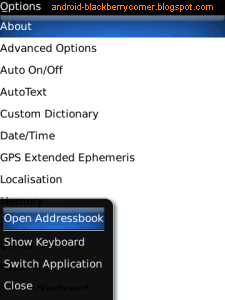
Do you want access your BlackBerry contacts from any where in your BlackBerry?
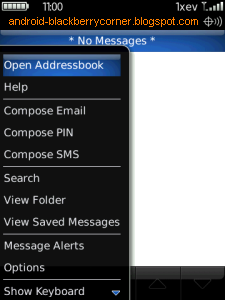
Use "1-Click Address book APP" to manage address book in your Blackberry. This app will add the menu item for all applications. So you can access your BlackBerry contacts from any where. Just by clicking the “Open Address book” in menu item you can access contacts from any where. This application is one of the best plug-in for your BlackBerry Address book. Use this tool save your time and battery. This app will help you to access your BlackBerry contacts very easily.
Use "1-Click Address book APP" to manage address book in your Blackberry. This app will add the menu item for all applications. So you can access your BlackBerry contacts from any where. Just by clicking the “Open Address book” in menu item you can access contacts from any where. This application is one of the best plug-in for your BlackBerry Address book. Use this tool save your time and battery. This app will help you to access your BlackBerry contacts very easily.

DOWNLOAD 1-Click Address book APP
Features "1-Click Address book APP" for Blackberry :
- One click to access the BlackBerry® Address book from any where.
- No need to run BlackBerry Address book as a background application. So save your battery.

Saturday, October 25, 2014
Download Call Logs Backup Restore App For Android devices

Simply you should to create a special folder where call log backup will be stored.
The backup is stored by default in /sdcard/CallLogBackupRestore folder.
This application helps if you need to keep a history of your all the calls (made from or received on your device). The Android system operation have possibility to keep a history of the 500 latest calls and any another call older is automatically deleted when the call overcome this limit.
Call Logs Backup & Restore has support for up 500 calls and with this app you can easily restore all the call log on your phone.
Another great function for this small application it is the possibility when you made an update for your phone, rooted or flashed the firmware of your device and lost all call logs, ‘Call Logs Backup & Restore’ is able to backup and restore your call logs. It is very easy to download it and install it on your smartphone, only go and click here to download Call Logs Backup & Restore from Google play market store.
The application comes with great features:
- The format for Backup Call Logs / History is in XML format.
- You can choose a scheduled time to automatically backup every day if you want to have an auto save job.
- Like as say before, you can choose the name of the file to make the backup.
- You can easily to open with a browser the XML file for viewing easily the content.
- We have the option to adding the date in readable format.
- Another great option it is to use an “Archive Mode” where the backup data keeps getting added to a single file.
- The Backup format is independent of the Android version, so you can easily to move your call logs from an old Android version to a new one, or invers.
- We have the option to select the backup file to be restored from the folder.
- We can easily view Backup Contents from within the App.
- With this application we can delete all Call Logs on the Phone.
- The application has possibility to Email us a backup file.
- A specific Option it is to delete old files automatically after specified number of days.
Backup: with this button we can to back-up all the Call logs on the phone to the xml file.
Restore: with this button we can read the xml file and creates a new Call log for every entry found in the file. The Duplicates are checked based on number, duration and date/time of the call.
View: with this button we can view the contents of the backup file.
Delete Backups: This button allows us to make a selection of backup files to be deleted.
Delete Calls: This button helps us to deletes all the Call logs on the phone, so that a Restore can be performed.
Donate: with this button if you wish to donate for the App via PayPal access this button.
In Menu Option we find:
Help: – with the help information about the ‘Call Logs Backup & Restore’ App.
Preferences: with this option we can open the Preferences Screen.
Send by Email: this option allows you to send the backup file by a custom email.
Friday, October 10, 2014
TuneUp Utilities 2013 Download

Is your PC not running as smoothly as it did when you first took it out of the box? A lethargic machine is oftentimes the result of a fragmented hard drive, an overabundance of junk files, and a Windows registry in disarray. If youd like to put some pep in the step of your sluggish desktop or laptop, then check out TuneUp Utilities 2013.
This application is designed to improve computer performance by tossing junk files, uninstalling unneeded programs, defragmenting the hard drive, and much, much more.
Overall, the software does a fine job of revitalizing a worn PC, but the license limitations keep it from reaching the heights of the Editors Choice award-winning.Getting Started
Compatible with Windows 8, 7, Vista, and XP PCs, TuneUp Utilities 2013 requires just an Internet connection for activating the license and receiving updates. Unlike Iolo System Mechanics 11, the Editors Choice among paid tuneup utilities, TuneUp Utilities 2012 limits you to only three installs.

When you first fire up the program, youre prompted to run a system scan that will dig up registry and defragmentation problems, as well as other issues. Afterward, you can either run the one-click cleanup or go to the Start Center to check out all the features. I went with the latter option.

TuneUp Utilities installation is relatively painless while taking up no more than 80MB of disk space. The program does require you to consent to sharing information about your machine in order to install. This is so TU can send system information to their server and check if there are any recent updates to the software or OS of your computer. Upon installation, 1-Click Maintenance will ask to run. This is the core of the utility. 1-Click will check everything including the registry, registry fragmentation, application shortcuts, Windows and program files, and hard disk fragmentation to find things that could use tidying up. These are some pretty standard protocols. Regular users will be satisfied with the 1-Click Maintenance tool as it is the main tool of TuneUp. After a successful scan, 1-Click will list all of the issues and subsequently list solutions.

For my main machine, it was mostly registry errors and shortcuts from software testing. Clicking on the issue count will bring up a report of what TU found. From there youll have an option to choose what to ignore or fix. Looking at 500 registry errors and 345 browser items, I got the feeling that TuneUp is not very discriminating about what it labels as a problem. "Anything that can be removed in exchange for performance must go" is the philosophy here. With a click of a button TuneUp will solve all of your problems. Additionally, the utility makes backups just in case something goes horribly wrong -- good practice for whenever you stick your hands in the registry jar.

Aside from 1-Click Maintenance, TuneUp Utilities 2013 also boasts a variety of tools to speed up overall performance. TU can help with optimizing your display/animation settings, removing software, and disabling startup programs. TU also includes a new tool called "Live Optimization." Live Optimization claims to prioritize programs that run in the background and will only dedicate processing power to those applications when they are being used. I saw it running on Adobe Acrobat and IrfanView when those programs were minimized. However, the differences may not be noticeable at first. The majority of the optimizing tools require some effort on your part to customize the settings to your personal usage. Luckily, TuneUp gives you 2 extra modes: "Economy" and "Turbo" to set your optimization to your specific need.

"Economy" is nice for laptop users looking to maximize their battery life with options similar to the power-saving mode built into Windows. "Turbo" allows you to schedule optimization and cleanup frequency as to not interrupt important moments when you need to squeeze the most power out of your machine. These modes can be switched on the fly. Uninstallation was simple and tidy. TU left few traces on both my Windows 7 and Windows 8 machines after removal, although it did require me to go through Windows Control Panel to uninstall.

Overall, I felt that the utility did what it claims to do and did it well. The test PCs booted up faster with the recommended optimization, which also improved overall responsiveness when launching applications and running programs. It might not make your computer feel brand new but it should improve performance enough to hold the format monster at bay. There are some powerful optimizing tools in TuneUp Utilities that I barely scratched in this review. Intermediate users will enjoy its full functionality but novice users should still be able to get most benefits that TU offers. Take advantage of the 15-day trial and discover how TuneUp Utilities 2013 is a serious contender in the optimizing market.

Features
Start Center has a mostly blue-and-white tabbed interface that highlights five sections: Status & Recommendations, Optimize System, Clean Up Computer, Fix Problems, and Customize Windows. Each tab has several useful, clearly-defined functions that are easy for the layperson to understand. The Status & Recommendations tab, which is the apps default screen, displays the number of problems found under the Fix Problems sub-heading and the Start 1-Click Maintenance button under the Maintain System sub-head. At the bottom of the window is an Optimization Status band that fills as you complete the steps needed to whip your PC into shape. I found it a nice way to stay on top of the maintenance process.

The TuneUp Browser Cleaner quickly and easily protects your privacy by deleting traces left by Internet Explorer, Google Chrome, Opera, Safari, Firefox, and other browsers, while also optimizing browser databases. The improved TuneUp Live Optimization provides performance boosts when you need them by recalling which programs and processes slow down your PC and allowing you switch these to "Standby" mode, with the help of TuneUp Program Deactivator. In addition, TuneUp Process Manager helps you detect resource-hungry applications even faster. The easy-to-understand information on all background processes shows you exactly whats running on your PC. And last, but not least, the new cleaning features raise 1-Click-Maintenance and Automatic Maintenance to a completely new level in PC optimization.
TuneUp Utilities introduces two new tools in this years release: TuneUp Disk Cleaner and TuneUp Browser Cleaner. The former removes left over bits when programs dont cleanly uninstall; the latter removes browser activity from the likes of Internet Explorer, Chrome, Firefox, and 22 other browsers.

TuneUp Uilities 2013 is more than a basic PC clean up application. It also contains many other functions including file backup and recovery, file deletion, Windows customization, and more. Some of the features duplicate native Windows function, but its convenient to have them in one central location.
The Cleanup Process
Clicking Start 1-Click Maintenance launches the system cleaner, which scanned my test bed and displayed numerous of registry problems, broken shortcuts, and other PC problems. Clicking the "Show Details" beneath each problem count took me to a new screen that described problems in everyday language. Clicking the Start 1-Click Maintenance button cleaned up the mess, eliminating all the previously listed problems.

I returned to the home screen after that task was completed, where I noticed that the Optimization Status bar was at 50 percent. Anxious to see it hit 100 percent, I began exploring TuneUp Utilities 2013s other options that freed up disk space and repaired a handful of problems. The application identified 41 programs that potentially should be disabled. I appreciated that TuneUp Utilities 2013 displayed star ratings culled from the applications user base that helped me quickly see which software that I should keep.
Performance Improvements

After running the tests, I used the computer extensively to get a sense of how the app had changed the responsiveness of the machine. Norton Utilities delivered a noticeable performance improvement; the entire OS moved at a snappier pace even with iTunes and Photoshop open. You can download tuneup utilities 2013 here
Friday, October 3, 2014
Deep Freeze Download
 Deep Freeze is a popular security software to protect your computer. Many people have downloaded this app to make their computers safe from virus intrusion or wrong settings. Usually if the deep freeze in most country is often used in the Internet cafe so that users could not damage the contents of the PC.
The work procedure of the deep freeze is to return all the contents of the computer before it is modified.
So even though you delete a single file from a windows computer, or even download a virus that makes computer badly damaged. With this software, after the computer restarts, then the whole of our actual computers and the file we add or remove will be returned as such an everlasting. So you cant save a file on a computer that is in the deep freeze, if in the Internet cafe usually was out manoeuvered by saving it in other computers over the network.
Now you already know the workings of deep freeze how to protect your computer. If you are interested and would you like to download this software, can help you dont want damaged computers and various other technical problems. Can you use to protect your Office or Internet cafe.

Just by restarting your computer will return just as they are. Thats offered deep freeze for you, they help PC users not to place unwanted problems in a way that could arguably dangerous. Why could arguably dangerous, because if you want to replace or add something on your computer but up forgotten password deep freeze, the only thing left to do is re-install your operating system. Although it could be was out manoeuvered with anti deep freeze.
Ive notice usefulness of deep freeze, but alas this is not free software, you have to pay to use it. But quiet there is a trial version of her if you want to try. To try download link below .
- Deep Freeze standard Version
- Deep Freeze Andarprise
If the link above doesnt work, please visit the authors website at faronics.com
*) For the trial version of deep freeze likely you should fill the form
Wednesday, October 1, 2014
How to Download Youtube Video Using the Firefox addon

How to download youtube video toflv format-mp3-mp4-3gp using theadd on Firefox.
Download video fromyoutube-flv 3gpformat - mp3- mp4 can be done by using an add-on Firefox Easy YouTubeDownloader. Firefox add on can be used free of charge, simply by opening the pageadd on Easy YouTubeDownloader and then install the firefoxbrowser, firefox browserrestart later,
thenwhen you open the youtube video automatically in the lower right part youtube video appeared on the "Download FLV-As 3GP-MP4-MP3 "
thenwhen you open the youtube video automatically in the lower right part youtube video appeared on the "Download FLV-As 3GP-MP4-MP3 "
One advantage ofutilizingthe add-on firefoxtodownloadyoutubevideoisan add-onfilesizesare small soto download andinstall ontoyour computerdoes not take long, andnottoo much ofa computermemory. And how todownloadyoutubevideoveryeasy,becausethe download buttontoappear automaticallyin the topright ofthe bottom of eachopenyoutubevideo.
To more easilyperform the following procedure:
Note: Ifthecomputer does not havegreasemonkeyaddoninstalled, it mustfirst enablegreasemonkey, we can see a guidehereto installgreasemonkeyinfirefox
How to downloadyoutubevideoscan beviewedonthe followingsteps:
1. Open thefirefoxaddonpages, toclick hereEasyYouTubeDownloader afteropenEasy YouTubeDownloaderpagelike this, Click the "Add to Firefox"
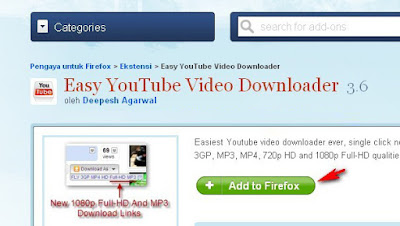
Wait until the install is complete.
Restart firefox browser
2. Open a video on youtube that you want to download
At the bottom right of the video will appear on the "Download As-3GP-MP4 FLV, MP3"
Restart firefox browser
2. Open a video on youtube that you want to download
At the bottom right of the video will appear on the "Download As-3GP-MP4 FLV, MP3"
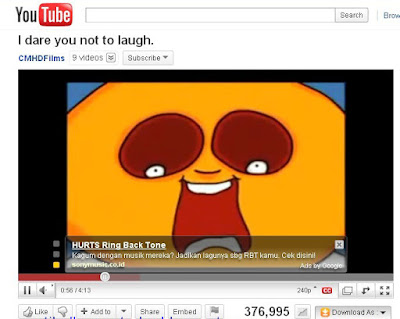
Click one of the formatting options available, it is automatically downloaded youtube video.
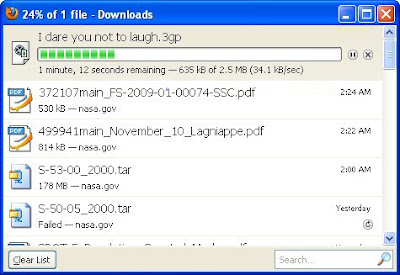
Please try the above way can hopefully help to downloadyoutube video easily.
Monday, September 29, 2014
Samsung Galaxy Prevail 2 Specification and User Manual Download
In this month (2013, July), Samsung was released their new smartphone named Samsung Galaxy Prevail 2. This phone also available as Samsung Galaxy Prevail 2 for Boost Mobile and Samsung Galaxy Ring M840 for Virgin Mobile. It work on CDMA network, so it will not work in any GSM network all over the world. In this post, today we provide a Samsung Galaxy Prevail 2 specification and user manual download link for buying guide.

Here is the specification of Samsung Galaxy Prevail 2 for buying guide.
| GENERAL INFO | |
|---|---|
| 2G network | CDMA 800 / 1900 |
| 3G network | CDMA2000 1xEV-DO |
| Announced | 2013, July |
| Status | Available. Released 2013, July |
| SIZE | |
|---|---|
| Dimensions | 122 x 63.5 x 12.7 mm (4.80 x 2.5 x 0.5 in) |
| Weight | 130.4 g (4.59 oz) |
| DISPLAY | |
|---|---|
| Type | Capacitive touchscreen |
| Size | 480 x 800 pixels, 4.0 inches (~233 ppi pixel density) |
| Features | Multitouch |
| SOUND | |
|---|---|
| Alert types | Vibration; MP3, WAV ringtones |
| Loudspeaker | Yes |
| 3.5 mm jack | Yes |
| MEMORY | |
|---|---|
| Phone book | - |
| Call records | - |
| Internal | 4 GB, 512 MB RAM |
| Card slot | microSD, up to 64 GB, 2 GB included |
| DATA | |
|---|---|
| GPRS | - |
| EDGE | - |
| 3G | EV-DO Rev. A, up to 3.1 Mbps |
| WLAN | Wi-Fi 802.11 b/g |
| Bluetooth | Yes, v4.0 with A2DP |
| Infra Red Port | - |
| USB | Yes, microUSB v2.0 |
| CAMERA | |
|---|---|
| Primary | 5 MP, 2592х1944 pixels, autofocus, LED flash |
| Features | Geo-tagging, touch focus, smile detection, panorama |
| Video | Yes |
| Secondary | Yes, 1.3 MP |
| FEATURES | |
|---|---|
| OS | Android OS, v4.1 (Jelly Bean) |
| CPU | 1.4 GHz |
| Messaging | SMS(threaded view), MMS, Email, Push Email, IM |
| Browser | HTML |
| Radio | - |
| Games | - |
| Colors | White, Gray |
| GPS | Yes, with A-GPS support |
| Java | Yes, via Java MIDP emulator |
| Other features | MP4/H.264/H.263 player MP3/WAV/eAAC+ player Organizer Document viewer Google Search, Maps, Gmail, YouTube, Calendar, Google Talk, Picasa Voice memo/dial Predictive text input (Swype) |
| BATTERY | |
|---|---|
| Type | Li-Ion 1750 mAh battery |
| Stand-by | Up to 490 h |
| Talk time | - |
| Music Play | - |
Monday, September 8, 2014
Download ICS Android apk Gallery Latest
Download ICS apk Gallery - Gallery is a photo gallery official ICS from Android 4.0 to the top of the deliberately customized to be able to run on the Android mobile OS gingerbrid above.
Ics gallery apk purpose of this application is to allow any Android phone or Android tablet can enjoy the larger galleries and more cool and complete course!
Gallery ICS can run smoothly on android os 2.2 and above.
Perhaps among all there is my friend who is interested to try this latest gallery ics apk, my friend please follow the link below to download it.
Screenshot:

Saturday, September 6, 2014
Download Youtube Vidoes from your Windows Mobile Phones for Free
Download Movie Files from your Windows Mobile Phones for Free.

You Tube Downloader built by DRM Removal, is a handy tool to download youtube videos from your Windows mobile phones. A very simple software with easy to use interface.
You can also search in Top Rated, Most Viewed & Most Recent category.
Browse through the list and search the video you want. Select the video that you want to download by checking the box in front of the video you.
Click the Menu button. Click the Download option. Thats all you have to do.
The Application Interface shows the download progress of the videos that are currently being downloaded.Also there is a help section which is accessible by the Help Button placed in the lower right corner of the Interface.
This application is supported by most windows mobile phones that support Portrait & Landscape Views.
Other Requirements include:
You can get your copy of the YouTube Downloader here.
Read here..
You Tube Downloader built by DRM Removal, is a handy tool to download youtube videos from your Windows mobile phones. A very simple software with easy to use interface.
Downloading a video
The interface consists of a search bar. Just type in the name of your favourite video . Clicking Search yields all the videos associated with that name in the form of a list each result having a checkbox in front of it.You can also search in Top Rated, Most Viewed & Most Recent category.
Browse through the list and search the video you want. Select the video that you want to download by checking the box in front of the video you.
Click the Menu button. Click the Download option. Thats all you have to do.
The Application Interface shows the download progress of the videos that are currently being downloaded.Also there is a help section which is accessible by the Help Button placed in the lower right corner of the Interface.
Key Features
The key features include being easy to use & fast, the picture & sound quality of the downloaded videos are excellent, there are no adwares or spywares & it’s FREE!!This application is supported by most windows mobile phones that support Portrait & Landscape Views.
Requirements
Running YouTube always means a good amount of data download. While using YouTube Downloader, it’s highly recommended that you take a good data plan or better use a wi-fi for downloading the Videos.Other Requirements include:
- A Windows Mobile Phone v 5.0 or higher
- .NET Compact Framework 2.0 or Higher installed.
- An internet Connectivity to access YouTube
Installation
Installing the YouTube Downloader for Windows Mobile is the simplest job. Just download the installer & run it.You can get your copy of the YouTube Downloader here.
Subscribe to:
Posts (Atom)