Showing posts with label Youtube. Show all posts
Showing posts with label Youtube. Show all posts
Sunday, October 26, 2014
Watch Recently Released Official Trailers of New Movies Coming Out on YouTube

Generally we browse the giant YouTube for watching funny videos, songs, movies, magic shows, how to guides, educational videos and much more. Additionally, we are curious to know the expected upcoming movies info in detail. Indeed, we surf YouTube to watch official trailers of new movies coming out.
When you search YouTube for officially released trailers of movies, you may find it hard to get the official version videos. It is because videos on YouTube are ranked according to the users searched keyword.
Another reason is that so many users uploads videos and they frame irrelevant keywords to their videos to get more exposure. This type of black hat technique creates confusion among normal video surfers. Unfortunately, they ends up in subscribing to unofficial video channels.
Watch Official Trailers of Movies

If you want to watch official movie trailers as soon as it appears on YouTube, you may need to subscribe to hundreds of video channels which looks not so cool.
To give a solution to this, YouTube is having a devoted channel which simplifies the concept of searching for officially released movie trailers. Especially official trailers of Hollywood movies are available on this page. When an official version of film trailers released on YouTube channels, shortly this page would get updated which makes available to watch those videos.
This channel is hosted by VISO Trailers which is the biggest trailer channel of YouTube. Just subscribe to this channel to watch new trailers of upcoming movies. Users can also watch HD trailers on this channel.


Wednesday, October 1, 2014
How to Download Youtube Video Using the Firefox addon

How to download youtube video toflv format-mp3-mp4-3gp using theadd on Firefox.
Download video fromyoutube-flv 3gpformat - mp3- mp4 can be done by using an add-on Firefox Easy YouTubeDownloader. Firefox add on can be used free of charge, simply by opening the pageadd on Easy YouTubeDownloader and then install the firefoxbrowser, firefox browserrestart later,
thenwhen you open the youtube video automatically in the lower right part youtube video appeared on the "Download FLV-As 3GP-MP4-MP3 "
thenwhen you open the youtube video automatically in the lower right part youtube video appeared on the "Download FLV-As 3GP-MP4-MP3 "
One advantage ofutilizingthe add-on firefoxtodownloadyoutubevideoisan add-onfilesizesare small soto download andinstall ontoyour computerdoes not take long, andnottoo much ofa computermemory. And how todownloadyoutubevideoveryeasy,becausethe download buttontoappear automaticallyin the topright ofthe bottom of eachopenyoutubevideo.
To more easilyperform the following procedure:
Note: Ifthecomputer does not havegreasemonkeyaddoninstalled, it mustfirst enablegreasemonkey, we can see a guidehereto installgreasemonkeyinfirefox
How to downloadyoutubevideoscan beviewedonthe followingsteps:
1. Open thefirefoxaddonpages, toclick hereEasyYouTubeDownloader afteropenEasy YouTubeDownloaderpagelike this, Click the "Add to Firefox"
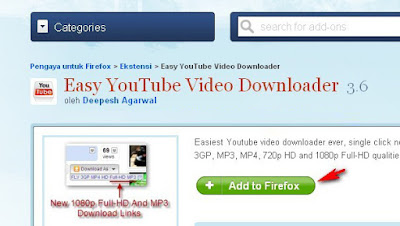
Wait until the install is complete.
Restart firefox browser
2. Open a video on youtube that you want to download
At the bottom right of the video will appear on the "Download As-3GP-MP4 FLV, MP3"
Restart firefox browser
2. Open a video on youtube that you want to download
At the bottom right of the video will appear on the "Download As-3GP-MP4 FLV, MP3"
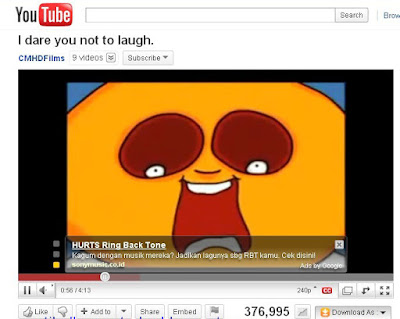
Click one of the formatting options available, it is automatically downloaded youtube video.
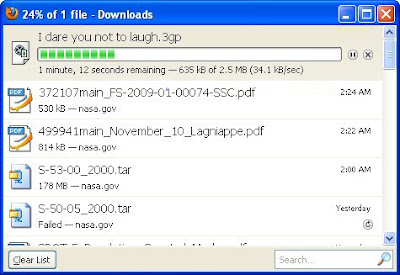
Please try the above way can hopefully help to downloadyoutube video easily.
Saturday, September 6, 2014
Download Youtube Vidoes from your Windows Mobile Phones for Free
Download Movie Files from your Windows Mobile Phones for Free.

You Tube Downloader built by DRM Removal, is a handy tool to download youtube videos from your Windows mobile phones. A very simple software with easy to use interface.
You can also search in Top Rated, Most Viewed & Most Recent category.
Browse through the list and search the video you want. Select the video that you want to download by checking the box in front of the video you.
Click the Menu button. Click the Download option. Thats all you have to do.
The Application Interface shows the download progress of the videos that are currently being downloaded.Also there is a help section which is accessible by the Help Button placed in the lower right corner of the Interface.
This application is supported by most windows mobile phones that support Portrait & Landscape Views.
Other Requirements include:
You can get your copy of the YouTube Downloader here.
Read here..
You Tube Downloader built by DRM Removal, is a handy tool to download youtube videos from your Windows mobile phones. A very simple software with easy to use interface.
Downloading a video
The interface consists of a search bar. Just type in the name of your favourite video . Clicking Search yields all the videos associated with that name in the form of a list each result having a checkbox in front of it.You can also search in Top Rated, Most Viewed & Most Recent category.
Browse through the list and search the video you want. Select the video that you want to download by checking the box in front of the video you.
Click the Menu button. Click the Download option. Thats all you have to do.
The Application Interface shows the download progress of the videos that are currently being downloaded.Also there is a help section which is accessible by the Help Button placed in the lower right corner of the Interface.
Key Features
The key features include being easy to use & fast, the picture & sound quality of the downloaded videos are excellent, there are no adwares or spywares & it’s FREE!!This application is supported by most windows mobile phones that support Portrait & Landscape Views.
Requirements
Running YouTube always means a good amount of data download. While using YouTube Downloader, it’s highly recommended that you take a good data plan or better use a wi-fi for downloading the Videos.Other Requirements include:
- A Windows Mobile Phone v 5.0 or higher
- .NET Compact Framework 2.0 or Higher installed.
- An internet Connectivity to access YouTube
Installation
Installing the YouTube Downloader for Windows Mobile is the simplest job. Just download the installer & run it.You can get your copy of the YouTube Downloader here.
Subscribe to:
Posts (Atom)