Showing posts with label hd. Show all posts
Showing posts with label hd. Show all posts
Wednesday, November 19, 2014
Lumigon T2 HD goes official

The consumers electronic company, Lumigon has announced a new smartphone named T2 HD. This device is made of stainless steel with a 8.5 mm thick frame. The display is covered with the Gorilla Glass 3 and has IP65 dust and water resistance.
The Lumigon T2 HD will come out of the box with a Dual-Core Qualcomm Snapdragon SoC clocked at 1.7GHz processor and Adreno 320 GPU, 4.3-inches screen with 720p display marked at 342ppi, 32GB, 64GB or 128GB of internal storage, two gigabytes of Random Access Memory, 13 megapixels of primary camera capable of recording of 1080p videos and 2.4 megapixels of front-facing camera, 1,700mAh powered battery and runs Androids version 4.4 KitKat over the hood.
.jpg)
The device will be available in Black and White color options and the dimensions are 127 x 64 x 8.7 mm. The handset weighs 148 grams and the connectivity options, it supports Bluetooth 4.0, GPS, FM-Radio, IR Blaster, air-gestures support, Near Field Communication (NFC). It comes with a stainless steel docks which helps in charging and data transferring. It will be available from the beginning of the second quarter of the year and the pricing is $1028. The limited edition 24-carat gold variant will be also accessible from the second quarter.
.jpg)
Source: Lumigon

Wednesday, October 22, 2014
Sprint preparing to launch HD Voice Before Year’s End
Sprint has indicated that it’s preparing to launch HD Voice service. Till the end of this year, the requirements for HTC Evo 4 G LTE are that the equipments must support voice HT and local network where the equipment’s owners connects to be upgraded and modernized with Vision Network. HD voice improves a lot the experience of talking on mobile phones. Sprint afirmed it will be released in limited edition this year and it will rise well before the end of 2013. The company says it is needed an upgrade to a critical mass of phones, plus improvements required at the network that can support HD Voice. Besides, Sprint needs to take different equipment than Evo HTC 4G LTE phone market. They explains that HD Voice technology will increase at the end of 2013 and in 2014, where significant growth is expected at the network and mobile phone that supports HD Voice by the end of 2014.
source: phonescoop
Saturday, October 18, 2014
How to copy DVD movies to the Kindle Fire HD on Win Mac
Wanna play your DVD movies on Kindle Fire HD? It is really difficult for us to find an effective player to resolve all our DVD videos. Actually, with the help of Pavtube DVD Ripper, we can easily deal with DVD playback issues.
The Kindle Fire HD is the second generation of Amazons Kindle Fire line of color touchscreen tablet computers. It features a new 1280×800 high definition LCD display that brings greater experience on movie watching. Recetly I got my Kindle for watching films or backing up my DVD Collection.

However, as we know, Kindle Fire HD cant play DVD directly because it cant have a DVD drive. Kindle Fire HD supports MPEG4, VP8, H.263 videos. To watch DVDs on my new Kindle Fire HD, I think I need to use a DVD ripping software to help you convert DVD to Kindle Fire HD supported video files such as MP4 format.
After trying a few free DVD converters, finallly I find Pavtube DVD Ripper, (Alternative Mac version) and purchased it so I can watch my DVDs on my new Kindle Fire HD. I chose Pavtube because the interface was very clear and the whole process seemed very straight- forward. It does a great job in ripping my DVD movies no matter from DVD discs, DVD movie folders, or DVD IFO/ISO image files to a common video for my Kindle Fire HD and a HTC cell phone too. Both the two programs are 30% off now.
How to convert DVD to Kindle Fire HD compatible videos files
The below guide uses DVD Converter Windows (Windows 8 compatible) screenshots. The way to rip DVD files to your Kindle Fire HD on Mac is almost the same. Just make sure you ge the right version.
1. Add DVD files to the program
Insert DVD movies into your DVD drive, then click "Load file" button to navigate to DVD movies you want to convert. As you can see, added files can be previewed on the right viewing window. You can adjust the video volume and take snapshots of your favorite movie scenes.

2. Set output options for Kindle Fire HD
Now choose the output format for playback on your Kindle Fire HD. You can get optimized videos for Kindle Fire HD under Format > Android > Amazon Kindle Fire HD H.264(*.mp4). The output videos could fit on your device perfectly. And choose the destination folder to save the converted videos.

Tips:
1. If you want to keep multiple audio tracks and subtitle streams when ripping DVD to MKV, MP4 and MOV, you can try to use Pavtube ByteCopy for Windows or Mac.)
2. You can click “Settings” to tweak the detailed video and audio encoding settings. Or click “Edit” button to trim video into several segments by setting a specific output file size, append special effects, crop video screen area, add text/picture watermark.
3. Start DVD to Kindle Fire HD conversion
After all the above settings, simply click “Convert” button to start converting DVD files to Kindle Fire HD video. Just wait for the converting process to be done. After that, find the converted videos in your output folder and transfer them to your Kindle Fire HD. In this way, you can play DVD files on Kindle Fire HD and enjoy them on the go.
P.S. If you have no idea about Kindle Fire HD file transfer, you can check out the post Synchronizing Your Content files (Videos, Pictures, Music) to Kindle Fire HD to learn more.
Rip “The Croods Blu ray” to Kindle fire HD
Description:
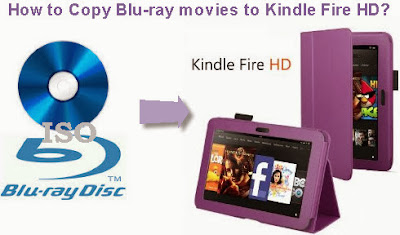
Following I will show you the Detailed steps.
Free download Blu-ray ripper or Blu-ray ripper for Mac
1.Load Blu-ray files
Inserted Blu-ray disc to your Blu-ray drive. Then click the "Load file" button to import the Blu-ray you want for Kindle Fire HD, You can also add DVD disc, ISO file, IFO file or DVD folder.
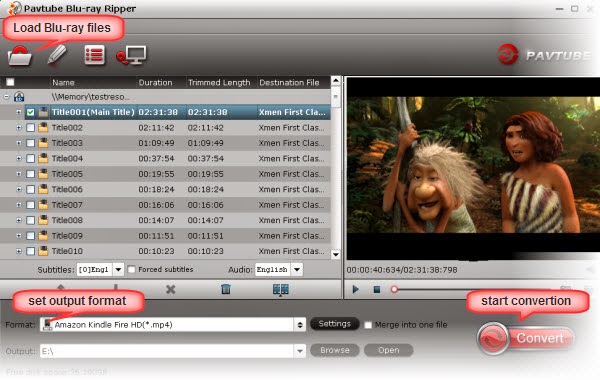
2.choose output format
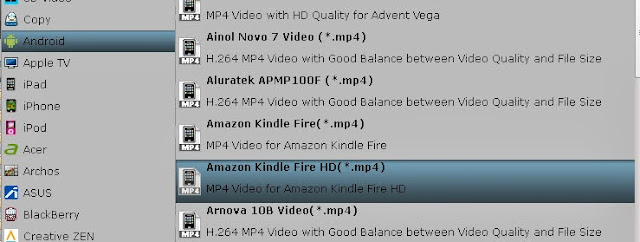
Click “Format” bar, here I recommend Android >> Amazon Kindle Fire HD H.264(*.mp4) as target format for your Kindle Fire HD
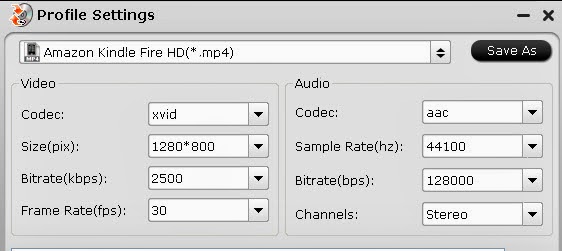
Tip 1: If you like, You can also click “Settings” to change the video encoder, frame rate, resolution, etc. Remember the file size and video quality is based more on bitrate than resolution which means bitrate higher results in big file size, and lower visible quality loss. According to my experience, for watching videos on the Kindle Fire HD 7-inch, 1280×720 / 1280×800 (Full Screen) with 1500~2000kbps is just all right and 1920×1080p with 2500~3000kbps for Kindle Fire HD 8.9-inch screen.
Tips2: you can click “Edit” button to edit your videos by cropping, trimming, adding watermarks, etc. you can choose the subtitles and audio track for the target video on the main interface.
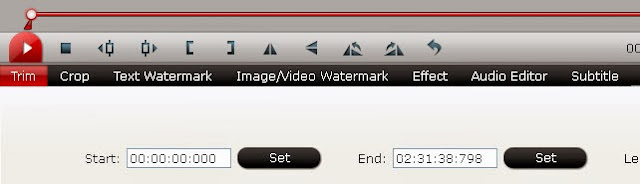
Step 3. Start the conversion
Just press the “Convert” button to start the conversion .It will not take much time. Just wait for the conversion process to get done. when the conversion is finished, you can click ”open” button to copy the converted MP4 video files to Kindle Fire HD for playing.
My doughter love the movie “the croods” very much, so I bought the Blu-ray disc on blu-ray website for her playback, but she unwilling watch the movie at home alone, she would like to share the movie with her school classmates, I am considering of converting the Blu-ray disc to MP4 format for Kindle fire HD playing, so that she could take the Kindle fire HD to her friends’ home viewing the converted movie together with them.
Blu-ray ripper is a powerfull tool i used frequently,I often use Blu-ray rippe to backup BD/DVD and convert various of videos. It is my wonderful helper.
Following I will show you the Detailed steps.
Free download Blu-ray ripper or Blu-ray ripper for Mac
1.Load Blu-ray files
Inserted Blu-ray disc to your Blu-ray drive. Then click the "Load file" button to import the Blu-ray you want for Kindle Fire HD, You can also add DVD disc, ISO file, IFO file or DVD folder.
2.choose output format
Click “Format” bar, here I recommend Android >> Amazon Kindle Fire HD H.264(*.mp4) as target format for your Kindle Fire HD
Tip 1: If you like, You can also click “Settings” to change the video encoder, frame rate, resolution, etc. Remember the file size and video quality is based more on bitrate than resolution which means bitrate higher results in big file size, and lower visible quality loss. According to my experience, for watching videos on the Kindle Fire HD 7-inch, 1280×720 / 1280×800 (Full Screen) with 1500~2000kbps is just all right and 1920×1080p with 2500~3000kbps for Kindle Fire HD 8.9-inch screen.
Step 3. Start the conversion
Just press the “Convert” button to start the conversion .It will not take much time. Just wait for the conversion process to get done. when the conversion is finished, you can click ”open” button to copy the converted MP4 video files to Kindle Fire HD for playing.
Saturday, October 4, 2014
How to Uninstall and Reinstall Apps on Motorola Atrix HD
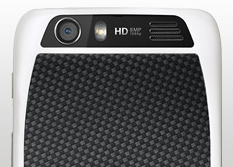
Follow these steps on how to uninstall and reinstall your apps.
To uninstall an app:
- Tap on Apps
 , then select the Gear icon or Settings.
- Select Apps, then tap All.
- Tap on the app you want to Disable or Uninstall.
Disabling the app will remove it from your menu. If you want to Enable it again, just reopen the window and tap Enable.
In case the app locks up your phone as you turn it on, just restart your phone in Safe Mode. Turn off your phone and turn it back after a minute. If you see a Motorola logo during the power up, press and hold both volume keys until you see the home Lcd, with Safe Mode in the lower left. Then you may try removing the app.
To reinstall an app:
If the app is from Google play store, simply go to Apps > Play Store > My apps. From there you can see your apps ready to download again.
Friday, October 3, 2014
How to Update Motorola Atrix HD
1. On your devices Lcd, tap on Apps
and go to Settings menu .
.2. Then select About phone..
3. Then tap System updates.
Make sure that your phone is connected to the Internet to install the update successfully.
Saturday, September 20, 2014
Lava Iris 550Q Android Phone with 5 5 inch HD Display
Lava Iris 550Q is the new smart phone from the company in the Iris series. This is a 5.5 inch device with IPS display that is based on OGS technology and is powered by a 1.2 GHz quad core processor and will be running on Android 4.2 Jelly Bean Operating System and also is a Dual SIM variant. Earlier this year we have seen the company lunching the Iris Pro 30 with a 4.7 inch HD display.
The Lava Iris 550Q is a 5.5 inch device with 1280 x 720 pixel resolutions powered by a 1.2 GHz quad core processor coupled with 1 GB of RAM and will be running on Android 4.2 Jelly Bean Operating System. There is an 8 MP camera on the back of the device with LED flash and BSI sensor that is capable of taking 1080p videos and a 2 MP front facing camera for video calling and selfies.
The on board memory of the device is at 4 GB that can be expandable up to 32 GB via micro SD card slot. The connectivity of the device includes 3G, Wi-Fi 802.11 b/g/n, Bluetooth 4.0, GPS with the usual 3.5mm audio jack and FM radio. The device is powered by a 2600 mAh battery with up to 10 hours of talk time in 2G.

The Lava Iris 550Q is a 5.5 inch device with 1280 x 720 pixel resolutions powered by a 1.2 GHz quad core processor coupled with 1 GB of RAM and will be running on Android 4.2 Jelly Bean Operating System. There is an 8 MP camera on the back of the device with LED flash and BSI sensor that is capable of taking 1080p videos and a 2 MP front facing camera for video calling and selfies.
The on board memory of the device is at 4 GB that can be expandable up to 32 GB via micro SD card slot. The connectivity of the device includes 3G, Wi-Fi 802.11 b/g/n, Bluetooth 4.0, GPS with the usual 3.5mm audio jack and FM radio. The device is powered by a 2600 mAh battery with up to 10 hours of talk time in 2G.
Specifications of Lava Iris 550Q
5.5 inch HD IPS display based OGS technology
1280 x 720 pixels resolutions
1.2 GHz quad core processor
Android 4.2 Jelly Bean OS
Dual SIM
8 MP rear camera with LED Flash, 1080p video recording, BSI sensor
2 MP front-facing camera
1 GB RAM
4 GB internal memory, expandable memory up to 32GB via microSD card slot
Connectivity: 3G, WiFi 802.11 b/g/n, Bluetooth 4.0, GPS
3.5mm audio jack, FM Radio
2600 mAh
1280 x 720 pixels resolutions
1.2 GHz quad core processor
Android 4.2 Jelly Bean OS
Dual SIM
8 MP rear camera with LED Flash, 1080p video recording, BSI sensor
2 MP front-facing camera
1 GB RAM
4 GB internal memory, expandable memory up to 32GB via microSD card slot
Connectivity: 3G, WiFi 802.11 b/g/n, Bluetooth 4.0, GPS
3.5mm audio jack, FM Radio
2600 mAh
Lava Iris 550Q will be coming in Black color variant and is priced at Rs. 13,000 with a free flip cover. The device will be going for sale through the major retail stores and online stores across India. Stay tuned for more information and updates.
Saturday, September 6, 2014
Oppo Find 5 Android Phablet with 5 inch screen Full HD 1080p
Oppo Find 5, Android Phablet with 5-inch screen Full HD 1080p - Oppo, it may not sound familiar to you, but the manufacturer from China has unveiled the worlds thinnest smartphone Oppo Finder.
And now oppore setting up the new product Find 5, which will be the challenger Samsung, LG, and HTC for Android phablet grade 5 inches.
And now oppore setting up the new product Find 5, which will be the challenger Samsung, LG, and HTC for Android phablet grade 5 inches.
Oppo Find 5 will come to use size 5-inch touch screen with a resolution of 1920 x 1080p FullHD, with a screen resolution of A Butterfly HTC recently introduced in Japan.
Oppo Find 5 using OS Android 4.1 Jelly Bean and powered by a quad-core processor Qualcomm APQ8064 1.5GHz and 2GB of RAM. Oppo Find 5 has a thickness of 6.9mm and comes with a 12 megapixel camera sensor denan Sony backlit.
Oppo Find 5 will be available in two versions namely 16GB and 32GB versions, and the device will be priced at 3000 yuan for the 16GB, while the 32GB version will be priced at 3300 Yuan
![Oppo]()
Oppo Find 5 using OS Android 4.1 Jelly Bean and powered by a quad-core processor Qualcomm APQ8064 1.5GHz and 2GB of RAM. Oppo Find 5 has a thickness of 6.9mm and comes with a 12 megapixel camera sensor denan Sony backlit.
Oppo Find 5 will be available in two versions namely 16GB and 32GB versions, and the device will be priced at 3000 yuan for the 16GB, while the 32GB version will be priced at 3300 Yuan

Thursday, September 4, 2014
Samsung to Launch Smartphone with Full HD Screen
Samsung to Launch Smartphone with Full HD Screen - Reportedly from one source that the Samsung is currently working to create a display with Full HD 1080p resolution that is supported by technology Super AMOLED screen. The screen density will reach at least 400 pixels per inch that is expected for the size of the screen that will be used a minimum of 5 inches or larger.
The plan will use the Samsung Full HD screens that are in the manufacturing phase for their latest smartphone product in early 2013. Where the Samsung will also cooperate with other manufacturers from South Korea namely Pantech are currently making Full HD screen and Pantech as well as one of the manufacturers 5-inch screen Full HD resolution. Pantech and Samsng will present their latest smartphone screen with 1080 p and likely to be present at the beginning of 2013.
The plan will use the Samsung Full HD screens that are in the manufacturing phase for their latest smartphone product in early 2013. Where the Samsung will also cooperate with other manufacturers from South Korea namely Pantech are currently making Full HD screen and Pantech as well as one of the manufacturers 5-inch screen Full HD resolution. Pantech and Samsng will present their latest smartphone screen with 1080 p and likely to be present at the beginning of 2013.

As we know that now there are some devices that use a 5-inch screen Full HD of which has been officially announced the HTC A Butterfly and besides there Oppo Finder 5, which will also use 5-inch screen with a resolution of 1080 p .. Not to forget that Sony is preparing their latest smartphone the C660X Yuga which will most likely use a 5-inch screen Full HD resolution but the screen will also be used by the Sony smartphone is made by Japan Display which is a joint venture between Sony, Toshiba, and Hitachi.
Other news is that LG and Sharp are now preparing to produce a screen size of 5 inches Full HD resolution is though no word on what the smartphone will use this Full HD screen. As in 2013, the major manufacturers will present their smartphone with a screen resolution of Full HD.
Other news is that LG and Sharp are now preparing to produce a screen size of 5 inches Full HD resolution is though no word on what the smartphone will use this Full HD screen. As in 2013, the major manufacturers will present their smartphone with a screen resolution of Full HD.
Wednesday, September 3, 2014
LG F240 Mobile Android 4 1 Jelly Bean and Specs FULL HD with Quad Core Snapdragon
LG F240, Mobile Android 4.1 Jelly Bean and Specs FULL HD with Quad Core Snapdragon - As we know that LG as one of the largest mobile phone manufacturers do not want to miss the android phone presents the latest innovations and more advanced technology to be able to compete with the current market, as some time ago where LG brings Android phone is quite attracted much attention including the LG Optimus M and Nexus 4 because both phones have superior specs in it. And now the phone with Full HD screen to be a popular one, and that can be offered by the mobile phone manufacturer LG which the party did not want to miss the back to bring a cell phone with a code known LG F240.
Phone with code LG F240 will use a Full HD screen, powered with a 1.5 GHz quad-core processor Snapdragon S4 Adreno 320 pro and in addition such as information obtained from the benchmark GLBenchmark seen on the internet that this phone will run the Android operating system 4.1 Jelly Bean .
It seems to be a lot of choice for people who want to have android phones that include Full HD HTC Droid DNA, Oppo Find 5 and Lenovo who was in the process of making an Android phone Dual SIM Full HD version. Are you interested in having one in Full HD is an Android phone, we wait for further information about Full HD android phone that will enliven the mobile market today and also Full HD android phone that will be presented by the LG namely the LG code F240.
ZTE Show Newest Mobile Windows Phone with 5 9 inch screen and HD resolution
ZTE Show Newest Mobile Windows Phone with 5.9-inch screen and HD resolution? -One site in the country namely China microblog service Weibo which is in China as well as Twitter in China, was exhibiting a photograph that is a Windows mobile phone and photo exhibited by one of ZTEs head of marketing called Lu Qian Hao. Seen in the picture that the phone will have a large screen size that measures 5.9 inches with a resolution of Full HD and DTS audio technologies contained therein.
When finally the ZTE phones bring to the market this phone is certainly going to be a first for a smartphone phablet windows phone which has a very large screen so users no longer need to buy a tablet. But unfortunately it has not been clear about whether to use the mobile phone operating system Windows Phone 8? but as we all know that the operating system Windows Phone 7.5 seem to be having expired and for the operating system Windows Phone 8 also been officially announced by the Microsoft, and of course, most likely this phone will run with Windows Phone 8 OS to date.
Subject Full HD resolution that will be used to screen phone looks doubtful for windows phone 8 as is known not to support this resolution and to present officially only supports a maximum of only up to 720 p but was informed that the ZTE will be making modifications or dikatakn WP 8 tweak where the phone can use Full HD resolution as expected.
When finally the ZTE phones bring to the market this phone is certainly going to be a first for a smartphone phablet windows phone which has a very large screen so users no longer need to buy a tablet. But unfortunately it has not been clear about whether to use the mobile phone operating system Windows Phone 8? but as we all know that the operating system Windows Phone 7.5 seem to be having expired and for the operating system Windows Phone 8 also been officially announced by the Microsoft, and of course, most likely this phone will run with Windows Phone 8 OS to date.
Subject Full HD resolution that will be used to screen phone looks doubtful for windows phone 8 as is known not to support this resolution and to present officially only supports a maximum of only up to 720 p but was informed that the ZTE will be making modifications or dikatakn WP 8 tweak where the phone can use Full HD resolution as expected.
Subscribe to:
Posts (Atom)