Showing posts with label optimus. Show all posts
Showing posts with label optimus. Show all posts
Wednesday, November 5, 2014
Verizon LG Optimus Exceed 2 leaks in Press render

LGs new smartphone deep in their pipelines for the Big Red Stateside carrier, Verizon Wireless is the new Optimus branded Exceed 2, according to the leading smartphone leakster, evleaks from Twitter.
The new phone is showed up in a new high resolution Press render, wearing the Verizon branded tags on its back. Upcoming LG made Optimus Exceed 2 is the South Korean manufactures successor model to their previous generation Exceed or so called Cayman or Lucid. The original handset was introduced back in 2012, where it carried out a Dual-Core 1.3GHz Snapdragon processor, four-inches screen, eight gigabytes of internal memory with microSD slot expansion, one gigabyte of RAM, five megapixels primary camera, 4G LTE connections and Android 4.0 Ice Cream Sandwich on board. But, accordingly this time around we dont see any kind of 4G LTE prints on the phone yet to go official from the Americans.
Unfortunately we still lack the information on the unannounced smartphones internal specifications listing, but we do expect this new phone to be a middle ranged Android device with a lower price tag from Verizon Wireless offering 3G network support, once announced.
Source: evleaks (Twitter)

Thursday, October 9, 2014
How to Backup and Factory Reset LG Optimus G Pro
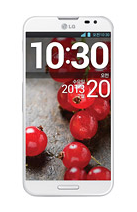
Resetting your Optimus G Pro will restore the default settings of your device. It will also delete all your files on your phone, so it is recommended to backup all your important files on your computer.
Luckily in Optimus G Pro, you can backup your data through your phone on privacy settings before wiping all the data on your phone. But if you want to erase all the content on your phone, then there’s no need for you to backup your data.
To backup your data:
You can only backup app data, Wi-Fi passwords, and other settings to Google servers.
Step 1. Tap on the Home Icon > Three Horizontal Lines or Settings.
Step 2. Select System settings > Backup & reset.
Step 3. Double check if the Backup account is correct.
Step 4. Then tap Back up my data. (A blue checkmark will appear.)
Step 5. If you want to set to the automatic restore backups, tap Automatic restore. (A blue checkmark will appear.)
To Factory Reset Your Optimus G Pro:
Step 1. Tap on the Home Icon > Three Horizontal Lines or Settings.
Step 2. Select System settings > Backup & reset.
Step 3. If you want to proceed in restoring the factory settings, tap Factory data reset.
Step 4. Then tap Reset phone.
Step 5. Enter the unlock sequence if you have, then tap Erase everything to confirm.
Friday, October 3, 2014
How to Uninstall Apps on LG Optimus L5
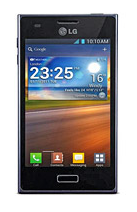
There will come a time that you no longer want to play the app that you have downloaded and want to remove it from your phone (LG Optimus L5). If this time will come, you just need to uninstall or disable the app so it will be removed on your phone.
Uninstalling apps is also necessary if you have less than 10% of space available on your memory, since your phone cannot receive new messages.
Follow these steps on how to uninstall your apps.
- Tap on
 .
.
- Select Apps tab, then Settings.
- Then choose Apps from the DEVICE category.
- Once all applications appear, scroll to and select the application you want to uninstall.
- Tap Uninstall.
Monday, September 22, 2014
LG Optimus Chat – LG C550 – LG C555

Find an LG mobile phone that’s designed to fit your life. If you use your mobile phone to stay connected all day, every day, a stylish, LG smartphone with all the bells and whistles is for you. Love to text and send pictures? Choose a QWERTY keyboard phone with built-in camera to text and send high-quality pictures and superior videos. You’ll find everything you’re looking for in a mobile phone, including state-of-the-art displays, GPS navigation and more.
(Source: LG)
List of videos:
Tech Specs:
| LG Optimus Chat – LG-C550 – LG-C555 | |
| General and Software | |
| Countries | Global |
| Series | Optimus |
| Form Factor | Side-Slider |
| Operating System | Android 2.2 Froyo |
| Physical Keyboard | Yes – Fisical QWERTY |
| Announced | 2011 February |
| Status Available | 2011 March |
| Browser & Internet | WebKit browser (HTML, WAP 2.0) |
| Java | MIDP 2.0 |
| Display | |
| Size, diagonal | 2.80 inches - 71.12 mm |
| Display Resolution | 320 x 480 pixels |
| Generalized Pixel Density | 206 ppi |
| TFT LCD – Touchscreen – Capacitive – 262K colors | |
| Connectivity | |
| WAN / Network 2G | GSM: 850 / 900 / 1800 / 1900 MHz |
| WAN / Network 3G | LG-C550: UMTS: 900 / 1700 / 2100 Mhz LG-C555: UMTS: 850 / 1900 |
| WAN / Data | GPRS / EDGE – HSDPA 7.2 Mbps, HSUPA 5.76 Mbps |
| Wireless LAN | Wi-Fi 802.11 b / g / n – DLNA (Digital Living Network Alliance) – Wi-Fi Hotspot |
| Bluetooth | Bluetooth 2.1 + A2DP + EDR |
| USB | MicroUSB 2.0 – Mass storage – Charging connector |
| Audio jack 3,5 mm | Yes |
| GPS / Location Based Services | A-GPS |
| Camera | |
| Camera Resolution (max) | 3 megapixels - 2048x1536 pixels |
| Camera secundary | No |
| Camera Focus | Autofocus |
| Camera Flash | No |
| Additional Camera Features | Geotagging, ISO, White balance |
| Media | |
| Media Formats | Android core media formats |
| Audio Player | MP3, AAC, eAAC+, AAC+, WMV, WAA |
| Video Player | MPEG4, H.263, H.264, WMV |
| Video Recording | Yes |
| Video Playback | Yes |
| Speakerphone | Yes |
| Loudspeaker | Yes |
| Radio FM | Stereo FM radio |
| Voice Recording | Yes |
| Processor and memory | |
| Internal memory | 140MB |
| Memory Card Type | MicroSD |
| Memory Card Size Supported | Up to 32GB |
| Sensors | |
| Proximity Sensor | Yes |
| Notifications | Vibration, MP3, polyphonics |
| Power | |
| Battery Type | Standard battery 1500 mAh |
| Talk time | Up to 5 hours |
| Stand-by time | Up to 400 hours (18.3 days) |
| Variant LG-C555: 1280 mAh – Talk tome 3h 35 m – Stand-by time 320 hours | |
| Divers | |
| Messaging | SMS, EMS, MMS, IM (Google Talk), Email (IMAP, POP3, SMTP), Push Email |
| Games | Yes, downloadable |
| Color | Black, silver, blue, red, pink |
| Phone Book | Yes |
| Organizer | Yes |
| Agenda | Yes |
| Calendar | Yes |
| Task | Yes |
| Notes | Yes |
| Predictive text | Yes |
| Watch | Yes |
| Alarm | Yes |
| Diary | Yes |
| Calculator | Yes |
| Document Viewer | Yes |
| Flight mode | Yes |
| Weight | 134 grams (4.73 oz) |
| Dimensions | 109 x 59 x 16.25 mm (4.29 x 2.32 x 0.64 in) |
| Computer Synchronization – OTA Synchronization | |
| Suite Google Mobile Services | |
Gallery:


Monday, September 8, 2014
LG Optimus Dual P698 User manual
LG Optimus Dual P698 User Manual -At first glance the Net Optimus Dual face similar P698 mobile-phone touch Lcds on the market first, the color black, four keys present just below the Lcd and matte plastic material covering the rear casing. At the front, there is a capacitive touch Lcd measuring 3.2 inches maximum resolution of 480 x 320 pixels. Relatively sharp with a depth of 256 thousand colors.
Four buttons on the bottom under each Lcd serves as the menu, home, back, and the shortcut key regulator of dual SIM card. At the rear theres only one camera without a mirror or flash. On the right side, youll find a microUSB port which can be used to transfer data and recharge the battery. On the opposite side there are volume control buttons.
Note: Optimus Net Dual P698 uses a 3.5 mm audio jack.
LG Optimus Net Dual is really full of features. Starting from LG SmartWorld as kiosk application Android Market alternative. In it, you can find a wide range of applications, games and so on. To get it, you haarus download LG SmartWorld first, Dan, you have to install a memory card because the internal memory capacity is very limited.
In addition there is the LG Social +, the media of social communication on the internet typical LG. If you know HTC FriendStream, more or less the same function. Through this application, you will be easier to access Facebook, Twitter, and MySpace. Next, Smartshare that lets you share content without going through DLNA (Digital Living Network Alliance). You can enjoy photos, music, videos with different Lcd with DLNA compatible devices.
Note: Mobile features dual SIM card technology.
LG Optimus Net performance overall satisfactory. Performance telephony, SMS, and internet smoothly. Friendly user interface display, almost the same as other Android phones. Because supported CPU 800 MHz processor, the Lcd is quite responsive and more agile data processing. LG provides a battery capacity of 1500 mAh Lithium Ion battery that can last 330 hours.
[Download User Manual LG Optimus Dual P698]
Friday, September 5, 2014
Comparison Samsung Galaxy S Advance vs LG Optimus L9
Comparison: Samsung Galaxy S Advance vs LG Optimus L9 - LG Optimus and Samsung Galaxy S L9 Advance both powered by a 1GHz dual core processor. LG Optimus L9 also equipped with PowerVR SGX540 GPU and 1GB of RAM. While the Samsung Galaxy S Advance comes with Mali-400MP GPU and 768MB RAM.
LG Optimus L9 has a touch screen with a larger size. LG Optimus L9 uses IPS LCD screen measuring 4.7 inches with a resolution of 540 x 960 pixels (234ppi). While the Samsung Galaxy S Advance using the touch screen 4-inch Super AMOLED screen with a resolution of 480 x 800 pixels (233ppi).
Samsung Galaxy S Advance has an internal memory capacity is larger, the size of 8GB. While the LG Optimus L9 only has an internal memory capacity of 4GB. Both come equipped with a microSD slot up to 32GB.
LG Optimus L9 and Samsung Galaxy S Advance is equipped with a 5 megapixel camera. LG Optimus L9 camera has the ability to record 1080p HD video, while the camera is the Samsung Galaxy S Advance has the ability to record 720p HD video. Both come equipped with a front camera, LG Optimus L9 comes with a VGA camera, while the Samsung Galaxy S Advance is equipped with a 1.3 megapixel camera.
LG Optimus L9 present uses the Android OS 4.0 Ice Cream Sandwich, the Samsung Galaxy S Advance while still using OS Android 2.3 Gingerbread, but Samsung will provide update Android 4.1 Jelly Bean.
For connectivity features both equipped with 3G support HSDPA and HSUPA, Wi-Fi with DLNA and Wi-Fi hotspot, Bluetooth, GPS, and microUSB port. And for power, the LG Optimus L9 comes with a battery capacity of 2150mAh, while the Samsung Galaxy S Advance is equipped with a battery capacity of 1500mAh.
Samsung Galaxy S Advance has a price tag of around Rp3, 2 million, while the LG Optimus L9 has a price tag of around Rp3, 4 millions. Id recommend the LG Optimus L9, by adding approximately 200 thousand you can get a smartphone with a bigger screen and faster performance.
LG Optimus L9
LG Optimus L9 smartphone that has a size of 131.9 x 68.2 x 9.1mm and weighs 125 grams is equipped with an application that is able to translate Qtranslator more than 44 different languages using Optical Character Recognition technology.
Samsung Galaxy S Advance
Samsung I9070 Galaxy S Advance is a dual core Android smartphone will be priced at an affordable price. Samsung I9070 Galaxy S Advance uses Android 2.3 Gingerbread OS with a 1GHz dual core processor support.
Advance Samsung I9070 Galaxy S comes with a Super AMOLED touch screen measuring 4 inches with a resolution of 480 x 800 pixels and is coated with Corning Gorilla Glass. Samsung I9070 Galaxy S Advance comes with other features such as a 5 megapixel camera, 1.3 megapixel front camera, 768MB RAM, 8/16GB internal memory, Bluetooth 3.0, Wi-Fi, HSPA network support, and battery capacity of 1500mAh.
Subscribe to:
Posts (Atom)