Showing posts with label 520. Show all posts
Showing posts with label 520. Show all posts
Friday, October 3, 2014
How to Personalize the Start Screen on Nokia Lumia 520
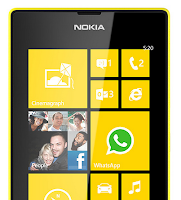
To pin an app:
1. On your devices Lcd swipe left to go to the apps menu.
2. Then tap and hold the app you wish to pin on the start Lcd.
3. And tap pin to Start.
To pin a contact:
1.First tap
 People.
2. Then tap and hold the contact you wish to pin on the start Lcd.
3. And tap pin to start. By pinning your a contact on the start Lcd, youll be able
to see their feed updates on the tile and you can call them directly from the
start Lcd.
To pin a website:
1. Go to a website that you want to access instantly .
2. Then tap
 and choose pin to start.
To move a tile:
1. Just tap and hold the tile.
2. Then drag and drop it to the new location and finally tap the Lcd.
To resize a tile:
1. Tap and hold the tile you want to resize
2. And tap the arrow icon.
To unpin a tile:
1. Tap and hold the tile.
2. And tap


Saturday, September 27, 2014
How to Make Your Nokia Lumia 520 a Wi Fi Hotspot
1. On your Start Lcd, swipe left, and tap
 Settings.
2. Then select Internet sharing.
3. Switch the Sharing to On.
4. If you want to change the name of your connection, tap Setup > Broadcast name, then enter the name.
3. Switch the Sharing to On.
4. If you want to change the name of your connection, tap Setup > Broadcast name, then enter the name.
5. If you want to secure your Wi-Fi hotspot, then you can also type in a password for the connection.
6. Then select the connection on the other device.
Wait for few seconds and your phone will start broadcasting its WiFi network name. Now you’re ready to connect your other device to your portable mobile wifi hotspot.
Note: "The other device uses data from your data plan, which may result in data traffic costs. For info on availability and costs, contact your network service provider", Nokia.
Nokia Lumia 520 User Manual PDF FREE Download
Subscribe to:
Posts (Atom)