Showing posts with label sms. Show all posts
Showing posts with label sms. Show all posts
Thursday, November 6, 2014
Best SMS text messaging apps for Android
Its all very exciting having the latest version of Android install itself on your mobile, but what happens when it makes changes you dont actually like?

Thats the situation owners of phones like the Nexus 4 and Nexus 5 found themselves in recently, as Googles exciting new Android 4.4 KitKat release arrived – and forced upgraders to use Googles own Hangouts app as the default SMS app.
Aside from no one really liking being told what software they have to use, the change was also a bit unsettling. The SMS tool is one of the most basic, reliable and unchanged features of any phone, with even the most backward of tech users usually able to work out how to send a simple text message.
But in Hangouts? Even experienced smartphone users struggled to work out how to send a simple text. Not only that, the term hangout is a dreary, predictable piece of brainstorming nonsense.
So if you fancy rebelling against Googles forced use of the Hangouts app and going your own way, here are five alternative SMS apps to install and bring texting back to basics on Android.
Plenty of customisation options await in this Android SMS app, with Hello SMS letting users choose if they want a standard notification or the entire screen to light up when messages arrive. Plus theres a night mode layout option with a dark background to supposedly save your eyes and battery when texting late.
The design is pretty jazzy, with a list of SMS threads down the left, plus a wider layout when viewing your texts in landscape mode.
Replies are threaded, albeit in a subtle, bolded highlight way, and its a fast, simple app to open and use. A long-press on the message icon lets you delete an entire conversation, while the attachment option is a swish combined gallery and camera app, splitting the screen between existing shots and a viewfinder for capturing and attaching live shots.
View this app on the Play Store
Handcents been around for a long time on Android, and it shows. The designs not particularly thrilling, offering a white and blue colour scheme that looks like its been ported from iPhone.
Still, beneath the clunky layout there are absolutely stacks of features in Handcent, with this texting app letting users add doodles to messages as image files, attach screen captures of the phones display, spellcheck messages before sending and, if you have a clear non-regional accent, input text via Googles speech-to-text tools.
The sending of messages can even be scheduled, if you need to establish a watertight alibi. Its a proper hardcore texting app for people who use their 3,000 SMS allowance each month.
View this app on the Play Store
EvolveSMS goes all-out on design, with a stylish layout that incorporates a swish landscape option, multiple font and text size options, Emojis and more.
A nice pop-up reply box makes responding simple, plus theres a pattern lock and the ability to set some conversations to private while leaving others unrestricted, and a choice of Home screen widgets.
You can also snooze incoming text message notifications for a set period of time, in the unlikely event youve got something better to do than look at your portable telephone.
And as nice as it looks, the appearance can further be amended by installing themes and other customisation packs.
View this app on the Play Store
Textra bravely claims its a "beautiful" texting app, and, if you like Androids old grey, boxy layout, it probably is.
To make it less pretty theres a custom Textra Emoji plugin that can be downloaded for free, if you like expressing yourself via silly emoticons, plus theres a built-in audio recording tool, for sending people clips of you speaking when typings too much of a chore.
In terms of customisation, theres much to play with. It supports pop-up message notifications, the changing of the notification LED colour (if your phone supports it), with users also able to customise the pulsing of the notification vibration – for the ultimate in stealth text alerts.
View this app on the Play Store
TextSecure has a bigger selling point than the rest: security.
On a basic level it restricts Android from taking screengrabs of messages, plus, if you demand more control and reassurance that the wife/government isnt reading everything you say, theres the option of locking the app down with a passphrase. And, for yet more protection, conversations between two users can be kept private with end to end encryption.
In terms of customisation, TextSecure delivers some fun consumer toys, with SMS delivery report tools, LED colour and blink pattern toggles for at-a-glance notifications, enter key modification and more.
Read here..
Thats the situation owners of phones like the Nexus 4 and Nexus 5 found themselves in recently, as Googles exciting new Android 4.4 KitKat release arrived – and forced upgraders to use Googles own Hangouts app as the default SMS app.
Aside from no one really liking being told what software they have to use, the change was also a bit unsettling. The SMS tool is one of the most basic, reliable and unchanged features of any phone, with even the most backward of tech users usually able to work out how to send a simple text message.
But in Hangouts? Even experienced smartphone users struggled to work out how to send a simple text. Not only that, the term hangout is a dreary, predictable piece of brainstorming nonsense.
So if you fancy rebelling against Googles forced use of the Hangouts app and going your own way, here are five alternative SMS apps to install and bring texting back to basics on Android.
1. Hello SMS
Plenty of customisation options await in this Android SMS app, with Hello SMS letting users choose if they want a standard notification or the entire screen to light up when messages arrive. Plus theres a night mode layout option with a dark background to supposedly save your eyes and battery when texting late.
The design is pretty jazzy, with a list of SMS threads down the left, plus a wider layout when viewing your texts in landscape mode.
Replies are threaded, albeit in a subtle, bolded highlight way, and its a fast, simple app to open and use. A long-press on the message icon lets you delete an entire conversation, while the attachment option is a swish combined gallery and camera app, splitting the screen between existing shots and a viewfinder for capturing and attaching live shots.
View this app on the Play Store
2. Handcent SMS
Handcents been around for a long time on Android, and it shows. The designs not particularly thrilling, offering a white and blue colour scheme that looks like its been ported from iPhone.
Still, beneath the clunky layout there are absolutely stacks of features in Handcent, with this texting app letting users add doodles to messages as image files, attach screen captures of the phones display, spellcheck messages before sending and, if you have a clear non-regional accent, input text via Googles speech-to-text tools.
The sending of messages can even be scheduled, if you need to establish a watertight alibi. Its a proper hardcore texting app for people who use their 3,000 SMS allowance each month.
View this app on the Play Store
3. EvolveSMS
EvolveSMS goes all-out on design, with a stylish layout that incorporates a swish landscape option, multiple font and text size options, Emojis and more.
A nice pop-up reply box makes responding simple, plus theres a pattern lock and the ability to set some conversations to private while leaving others unrestricted, and a choice of Home screen widgets.
You can also snooze incoming text message notifications for a set period of time, in the unlikely event youve got something better to do than look at your portable telephone.
And as nice as it looks, the appearance can further be amended by installing themes and other customisation packs.
View this app on the Play Store
4. Textra SMS
Textra bravely claims its a "beautiful" texting app, and, if you like Androids old grey, boxy layout, it probably is.
To make it less pretty theres a custom Textra Emoji plugin that can be downloaded for free, if you like expressing yourself via silly emoticons, plus theres a built-in audio recording tool, for sending people clips of you speaking when typings too much of a chore.
In terms of customisation, theres much to play with. It supports pop-up message notifications, the changing of the notification LED colour (if your phone supports it), with users also able to customise the pulsing of the notification vibration – for the ultimate in stealth text alerts.
View this app on the Play Store
5. TextSecure
TextSecure has a bigger selling point than the rest: security.
On a basic level it restricts Android from taking screengrabs of messages, plus, if you demand more control and reassurance that the wife/government isnt reading everything you say, theres the option of locking the app down with a passphrase. And, for yet more protection, conversations between two users can be kept private with end to end encryption.
In terms of customisation, TextSecure delivers some fun consumer toys, with SMS delivery report tools, LED colour and blink pattern toggles for at-a-glance notifications, enter key modification and more.

Tuesday, October 28, 2014
How to send a SMS without showing mobile number
Have you ever cheated someone by messaging. I think you wanted to be but worried about knowing your number, isnt it. But it is over and you can say bye bye to those kind of worried situation, because foosms.com has brought out a online messaging application, which
does not let the receiver know your mobile number, instead of that they send their company tag. Isnt it pretty cool. But it cant send messages to DND (do not disturb) number. However one can deactive DND service by calling to the service provider.
Though I am writing about this, this is my kind request to you that do not use this in illegal purposes. You can use it just for having fun with friends.
Follow the following steps
1) Go to foosms.com
2) Now you will have a SMS field like this
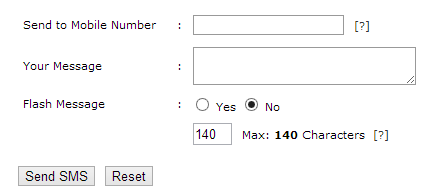
3) Type the phone number, your message (within 140 character)
4) Click on Send SMS
Thats all about sending a message without showing your mobile number. I again request you that dont be cheap by using it illegally. Hope you enjoyed.
2) Now you will have a SMS field like this
3) Type the phone number, your message (within 140 character)
4) Click on Send SMS
Thats all about sending a message without showing your mobile number. I again request you that dont be cheap by using it illegally. Hope you enjoyed.
Saturday, September 6, 2014
Facebook Messenger will be Tough Competitor for WhatsApp and SMS Applications
Facebook Messenger will be Tough Competitor for WhatsApp and SMS Applications - Facecbook previously reported that the plan to purchase the application WhatsApp but ultimately that Facebook has other plans after the Facebook launches Facebook Messenger in different formats and separate from their official site and also Facecbook Messenger application is also able to be used even if the user does not log in to your Facebook account owned.
Facebook Party hopes to steps taken by them is that the Facebook Messenger app could attract many enthusiasts and is widely used by many people for chatting as well as applications that have been circulated beforehand that whatApp, Blackberry Messenger and so on. Foolproof way provided by the Facebook for using Facebook Messenger app is that users only use the phone number on the handset device coupled with its very easy pendaftaraan also where the user just fill in the names and numbers also owned it.
Facebook Messenger application is expected by the Facebook can also attract many new users to the social networking site Facebook where they are when someone finally installing Messenger Facebook application on their phone, it will be one step closer to a persons proficiency level will be the users of Facebook. Currently for renewal Facebook Messenger service model is only available in a few countries such as India, Indonesia, Venezuela, Australia, and South Africa.
But unfortunately, until now there has been no information on when kepastiaan Facebook Messenger app will be officially available for iOS. Facebook Party has a plan that future Facebook Messenger app is able to compete with several other applications that have been outstanding and popular today as applications WhatsApp, BBM, SMS and so on.
Subscribe to:
Posts (Atom)